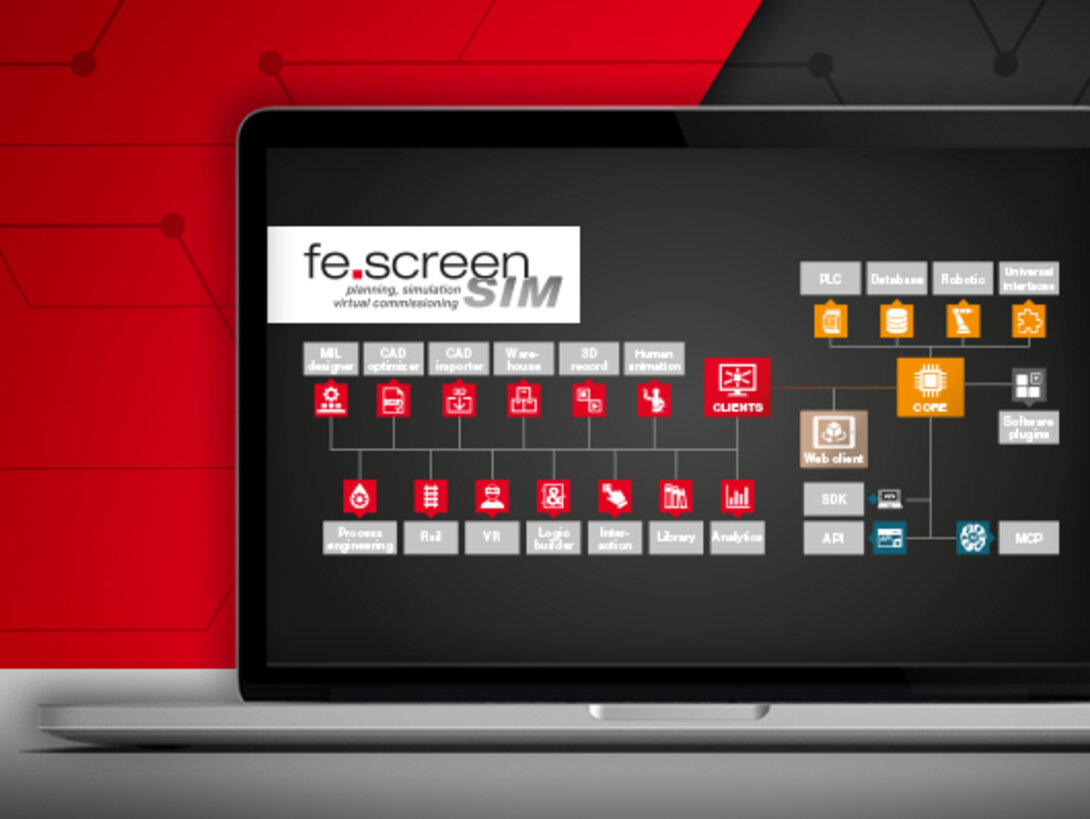
Software structure – Clients and optional modules
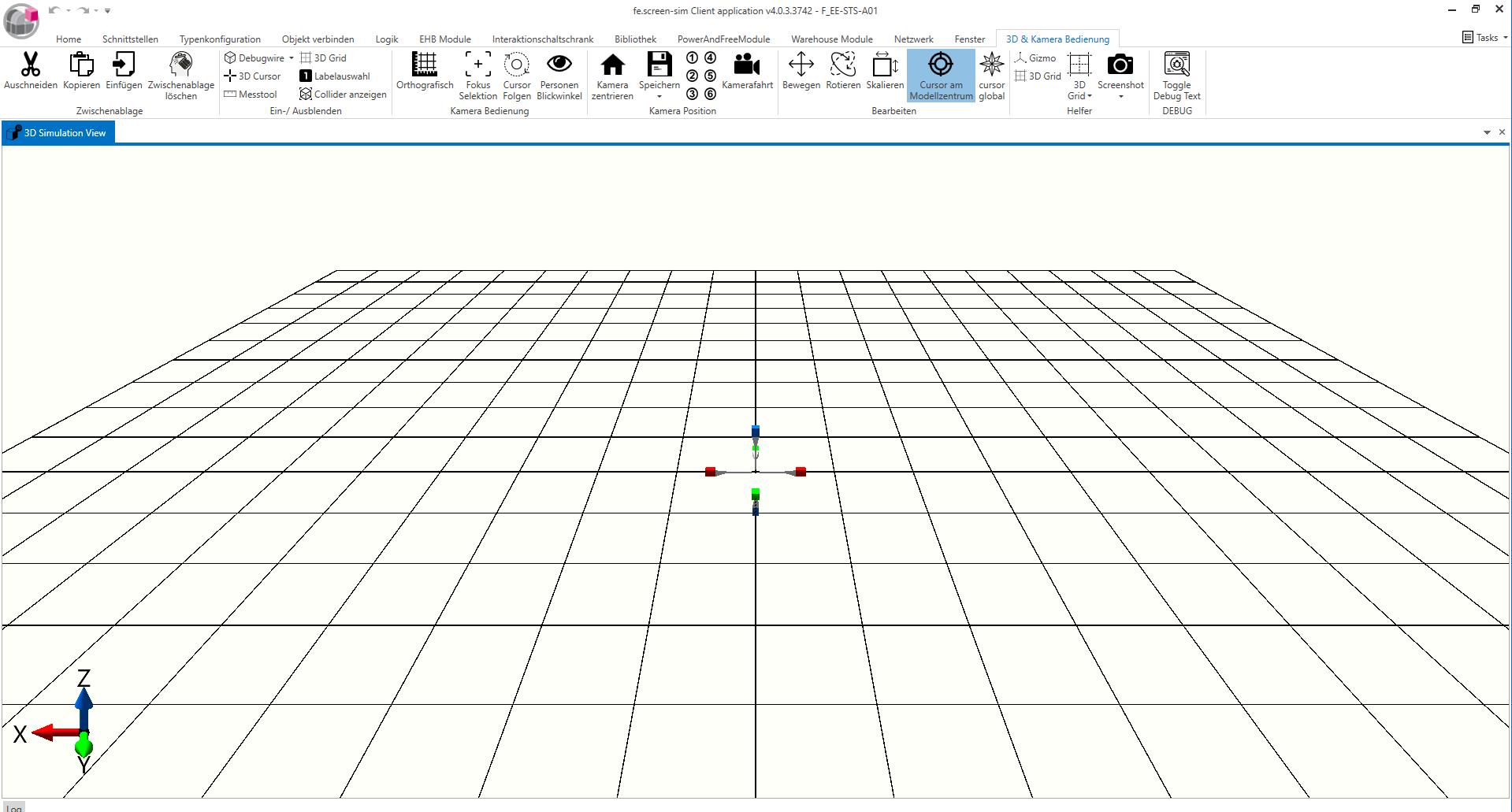
The architecture of fe.screen-sim essentially consists of a multi user capable core client application, whereby the Client represents the user interface and connects to the core via a network. Users thus have direct access to the model running there, work in an interactive 3D environment, and control the simulation via a clearly structured, intuitive user interface. This allows multiple users to work efficiently on a joint project at the same time – transparently, synchronously, and in real time. This structure forms the basis for the efficient creation and editing of simulation projects and offers comprehensive modeling and configuration functions.
All relevant project data and functions are available in the client's runtime module – just like in the full client. However, no changes can be made to the models, logic, or configuration here. It is not possible to edit simulation objects, customize interfaces, move elements, or make any other modifications. The module is used exclusively for executing the project and utilizing the existing PLC communication. The module can only be used in combination with the Core Runtime module.
Optional modules
fe.screen-sim offers a number of optional modules to extend the range of functions – suitable for the respective requirements and areas of application. Learn more about the individual modules:
3D record

The 3D record module allows you to record an ongoing simulation in its entirety and then view it as an interactive 3D playback. Users can move freely around the room, change perspectives, and analyze processes from any desired angle—regardless of the original camera path.
The recorded records can be viewed without an additional fe.screen-sim license – ideal for training courses, presentations, or sharing with external partners.
Analytics

The Analytics module enables precise recording and evaluation of signals and data points – known as KPIs (Key Performance Indicators) – directly from the running simulation. A wide range of chart types is available for this purpose, from classic time series to complex comparison and analysis charts.
All charts can be customized in detail via a clearly structured user menu: colors, axes, legends, display types, and other visualization options can be configured individually. This provides users with meaningful key figures in real time directly on the digital twin. Thanks to the latest developments in cycle time analysis, production cycles can be precisely simulated and optimized in a targeted manner – directly in the simulation tool.
CAD importer

The CAD importer allows the import of construction data from various formats, such as SolidWorks, STEP, JT, OBJ, or FBX, to be imported directly into the simulation model.
fe.screen-sim imports the entire tree structure from the CAD model, including existing kinematics.
CAD optimizer

The CAD optimizer allows CAD models to be quickly prepared for optimal use in fe.screen-sim. The module optimizes complex CAD files by selectively simplifying them and reducing unnecessary detail. The result is a significantly lower computing load and noticeably improved rendering performance.
Simply load your CAD data into the CAD optimizer and optimize it to the desired level of detail.
Your graphics card will thank you!
Human animation

The Human animation module allows human interactions to be mapped and analyzed directly in the 3D environment – either along defined paths or using user-defined movement patterns.
This includes assembly and transport activities, walking routes, or manual workflows – the speed can be adjusted variably. The module thus enables the realistic representation of processes that have not yet been automated – including the insertion or removal of components by people. This allows various workflows in the plant to be accurately simulated and analyzed.
Interaction

The Interaction module is used to integrate control and safety elements such as switches, buttons, fuses, or emergency stop systems. It supports realistic simulation of user interactions, thereby facilitating virtual commissioning of the plant.
The module offers a graphical 2D editor for arranging and configuring the control elements. In the simulation, the corresponding control cabinets are automatically generated in 3D. Interactions are possible in both the 2D editor and the 3D view, with changes being applied to both. Predefined graphical buttons can be created dynamically at runtime – for example, to replicate complete plant control consoles or control cabinets.
Library

The Library allows you to build your own object library for reuse in projects — ideal for standardization and increased efficiency.
The main task of the library is to combine simulation models and define them as new objects. To do this, existing elements and new models – with a wide variety of textures, sizes, and scales – are used. The individual parameters can be easily adjusted, and complex sub-systems can be generated as new objects. A library instance can be integrated into simulation projects by any user as needed.
Logic

In fe.screen-sim, user-defined process Logics can be created to control behavior models. The implementation can be done either in the function plan (FUP) for users with a PLC background or in C# for complex and individual control requirements. In addition, the system supports the FMI (Functional Mock-up Interface) and the associated FMU (Functional Mock-up Unit) simulation model containers.
Logic is defined via an intuitive graphical user interface that supports the user in complex processes with predefined standard modules. Interfaces to the simulation can be flexibly defined using predefined data types, including the assignment of simulation object properties and PLC variables. With the help of logic blocks, processes can be created or existing plant processes can be replicated.
MIL designer

With MIL designer, conveyor systems can be quickly designed and optimized using library models – without any PLC coupling or complex definition of sequence controls. The tool analyzes material flows, determines optimal transport routes, and simulates processes, even faster than in real time if desired. The module thus supports the early design and functional configuration of a system using the model-in-the-loop method.
Process engineering

The Process engineering module allows you to build and test process engineering and HVAC systems such as heating, ventilation, and air conditioning schemes in 2D. This enables complex control schemes, process flows, and system behavior to be realistically mapped and simulated directly in fe.screen-sim.
Rail

The Rail add-on module enables the simulation of electronic overhead conveyors (EOC) and power and free systems. The characteristic functions of both conveyor technologies, such as individual travel behavior, coupling and decoupling processes, congestion and buffer behavior, and flexible routing, are realistically represented. The module is suitable for the planning, validation, design, and simulation of complex conveyor systems in production and logistics environments.
VR

The VR module uses virtual reality headsets (all SteamVR-compatible headsets are supported, such as Oculus Rift, Quest, HTC Vive, and Vive Pro) to enable immersion
in the simulation, thus opening up a completely new form of presentation. Sizes and distances can be better assessed compared to viewing on a monitor.
The viewer offers navigation options via VR-compatible controllers. Any number of viewers can thus view the simulation at any time – with their own viewing angle and choice of position. Interactions with conveyed material or 3D buttons are also possible, making the viewer the ideal solution for control tests.
Warehouse

The Warehouse module enables the simulation of even very large warehouses and logistics facilities and supports the analysis and optimization of material flows, facility capacities, and storage strategies. This makes the module particularly suitable for extensive or complex intralogistics systems.
In fe.screen-sim, the warehouse geometry is defined either using a wizard to enter key data — i.e., how many storage locations are planned in the X, Y, and Z dimensions or double storage — or by importing Excel data, which is particularly advantageous for non homogeneous warehouses. Both chaotic and orderly warehousing can be simulated. Arbitrary stacking of piece goods is no problem. If storage and retrieval machines are used, these are created from a combination of basic simulation models.
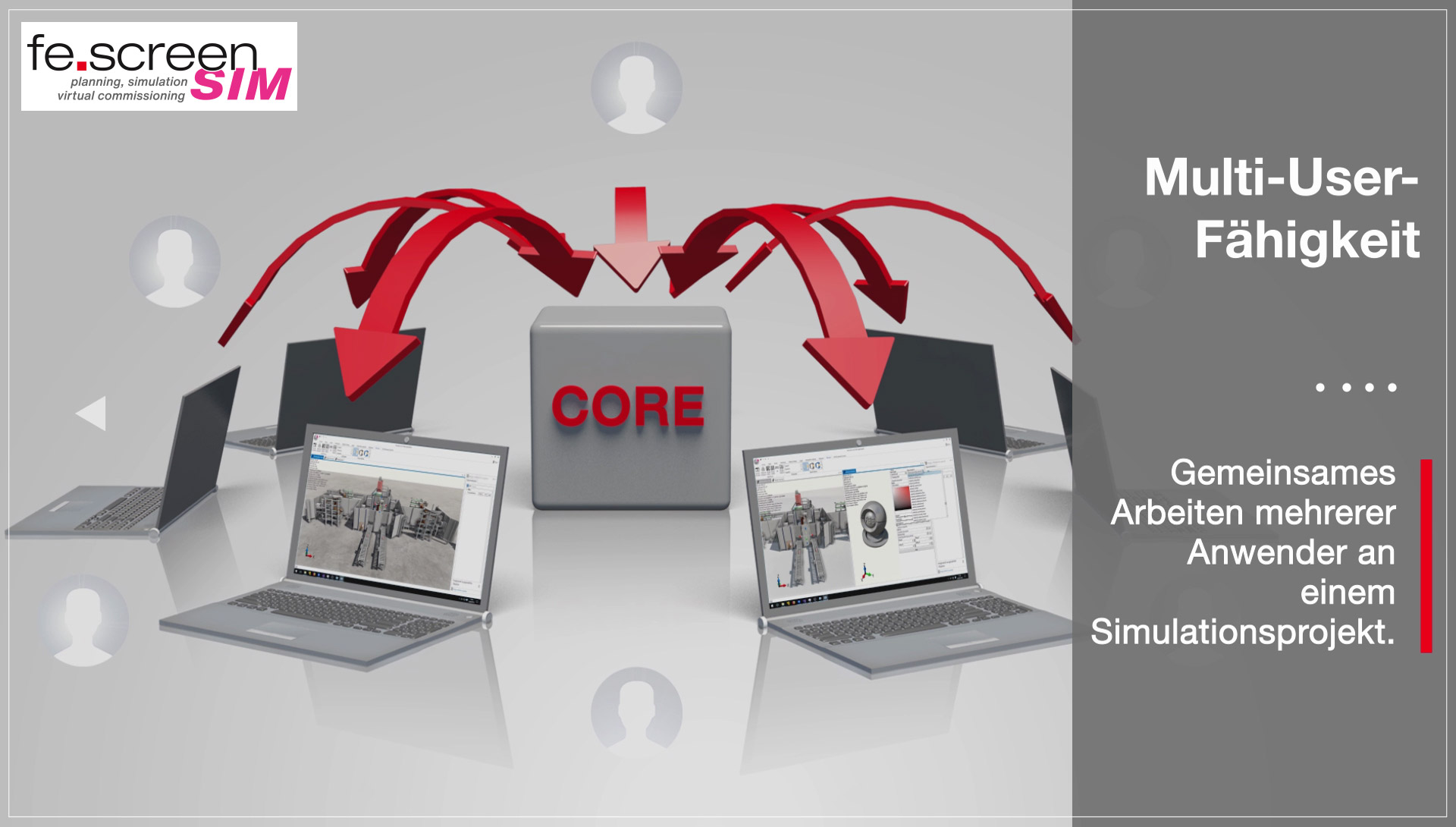
Multi-user capability thanks to client core structure
The calculations for the simulation model run in the core. In addition, there are the complex physical calculations, such as acceleration and gravity. The client, which contains the 3D view and all standard control elements, connects to the core module.
Because several clients can connect to a core, fe.screen-sim makes it possible for several users to work on one project and build large projects. Different user rights can also be assigned.





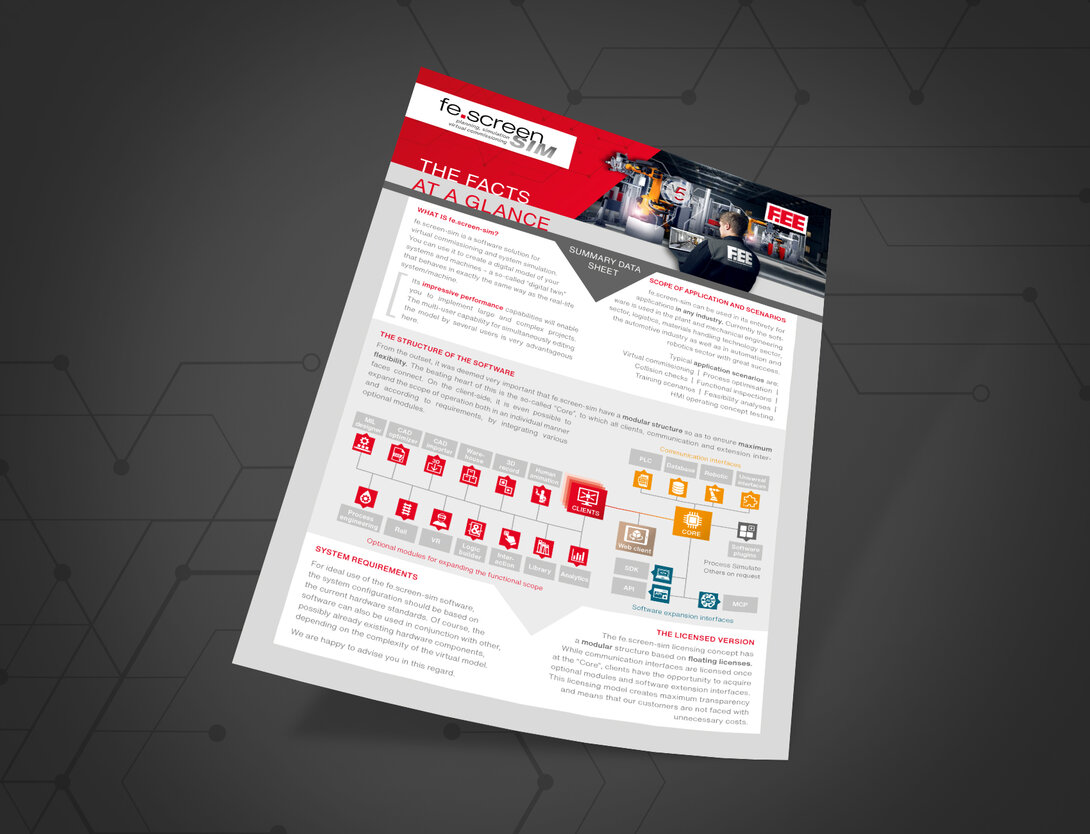
The structure of the virtual commissioning software at a glance
You can find an overview of all information on the structure of the virtual commissioning software and the optional expansion options here.



Your personal contact person – for more clearness
You are a project or department manager and are faced with the question of how to set up a digital twin for your project? We would be happy to talk to you personally about your requirements, the time frame, the possible project approach and give you an initial cost estimate.