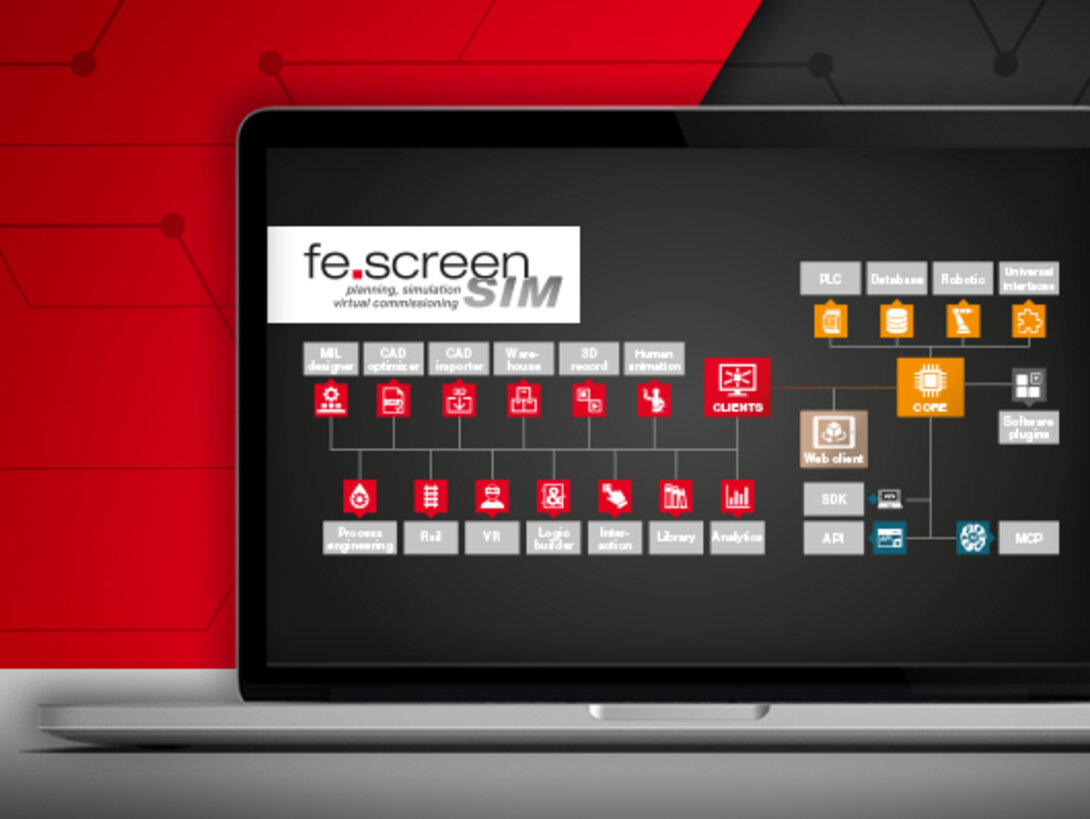
software structure – Core and communication interfaces
High performance thanks to a strong core: The Core forms the physical calculation system of the simulation. The module runs in the background, ensures smooth simulation, and enables the realization of large, complex projects thanks to its high performance. In addition, it serves to initialize communication interfaces with controllers and performs real-time calculations – thus forming the technical basis of the entire process logic.
The Core has the special feature that it can also be operated on another PC. The more powerful the PC's processor, the better. Multithread implementation supports all new and upcoming multiprocessor CPUs from AMD and Intel. If necessary, particularly large simulation systems can also be distributed across multiple cores.
The runtime module provides all relevant data and functions for the project. Its primary purpose is to provide control logic and computing resources, for example, to perform tests in the context of PLC communication.
communication interfaces
Since flexible connection options are very important to many customers, fe.screen-sim now offers more than 30 interfaces for communication with a wide variety of systems.
PLC

Any number of programmable logic controllers (PLCs) can be connected to fe.screen-sim. Communication is established via native drivers. In addition, a direct connection to a real controller can also be established.
Supported PLC systems:
- Siemens (real PLC) & PLCSIM Advanced:
Provides an interface for connecting to real Siemens controllers and PLCSIM Advanced. - Siemens SINUMERIK ONE:
Communication interface for connecting to Siemens SINUMERIK ONE Create MyVirtual Machine. - Rockwell drivers (real PLC):
Provides a communication interface for connecting to real Rockwell controllers. - Rockwell Logix Echo:
Enables communication with Logix Echo, a virtual environment for Rockwell controllers. Ideal for simulation-based testing without physical hardware. - Beckhoff:
Provides a communication interface for connecting to Beckhoff TwinCAT. Supports both real and virtual controllers. - Bosch Rexroth ctrlX:
Provides an interface for connection to Bosch ctrlX controllers. - B&R:
Provides an interface for communicating with B&R controllers. - CODESYS Simulation Interface (Add-on, Preview):
Provides a particularly fast connection option for CODESYS-based controllers. - Fanuc:
Enables connection to Fanuc CNC controls. Ideal for simulating manufacturing processes in combination with Fanuc controls. - Mitsubishi:
Establishes a connection to Mitsubishi controllers. - OMRON:
Connection of the simulation to a Sysmac controller (hardware or simulation) via the OMRON Sysmac Gateway Network Interface and the OMRON Sysmac Gateway Connector – including reading and writing of the configured variables.
Robotic

Robots can be quickly and easily integrated into a simulation via the robotic interface. Users can verify the offline robot program in the complete system network. Since no material paths need to be defined when using robots, the time required for simulation is minimal. All robot movements are executed precisely and realistically by the physical system in fe.screen-sim. Collision checks can be performed at any time, allowing safety areas to be verified.
Driver interfaces to robots:
- ABB (ABB RobotStudio):
Establishes a connection to the ABB RobotStudio suite and allows data exchange. - DENSO:
With the DENSO robot interface, you can link fe.screen-sim to WINCAPS III and connect the simulated DENSO robots in fe.screen-sim to the virtual system. - Epson:
Provides a communication interface to Epson robots via the RC+ software and enables the exchange of relevant control data for realistic simulation. - ESTUN:
Enables connection to ESTUN robots and thus supports bidirectional data exchange for robot control in the simulation. - Fanuc (Fanuc ROBOGUIDE):
Integrates FANUC ROBOGUIDE via an integrated communication interface. - isel:
Supports connection to the isel robot simulation and enables data exchange with the simulated robot from isel Robotics. - Kawasaki:
Network coupling of several Kawasaki robot controllers to fe.screen-sim via the Kawasaki Robot Connector. Exchange of the configured robot variables. - KUKA (iiQWorks):
Coupling of fe.screen-sim to KUKA iiQWorks – both locally and via network – with direct transfer of the configurations and simultaneous simulation of several robots. - KUKA (KUKA.OfficeLite):
Enables communication with KUKA.OfficeLite via a dedicated interface. - Mitsubishi (RT ToolBox3):
Enables connection to Mitsubishi RT ToolBox3 for data exchange. - NACHI:
Connects NACHI robots via the FD on Desk III programming software and allows direct data exchange for precise mapping of robot functions in the simulation. - RoboDK:
Provides an interface for integrating RoboDK into the simulation environment. - Stäubli (Robotics Suite):
Communication interface for connection to Stäubli Robotics Suite. - Universal Robots (UR Sim):
Supports connection to UR Sim from Universal Robots for simulation and control. - Yaskawa (MotoSim):
Communicates directly with Yaskawa MotoSim EG-VRC via a specialized interface.
Database + Universal interfaces

- acontis EC Simulator (plugin):
Enables the simulation of EtherCAT devices directly on the same PC as fe.screen-sim – integrated via EC-Engineer. PLC integration works as usual: virtual devices behave just like real hardware. - Modbus:
This interface can be used to create a Modbus master and connect it to a Modbus slave. - MQTT (Client):
This interface can be used to create an MQTT client and connect it to an MQTT broker. - OPC UA (Client):
This interface can be used to create an OPC UA client and connect it to an OPC UA server in order to search its nodes and automatically generate node symbols in fe.screen-sim. - RFC 1006:
The module can be used to create RFC 1006 (ISO-on-TCP) server and client components that can be configured for data exchange with other RFC 1006 endpoints. - Shared memory interface:
Fast local coupling via named shared memory on the same PC. fe.screen-sim creates the memory area or connects to an existing area and exchanges variables via memory image. - SQL connection (Microsoft):
This module establishes a connection to Microsoft SQL Server and provides comprehensive database access for simulation and virtual commissioning. SQL queries and data manipulation can be performed directly from the fe.screen-sim environment. - SQL connection (MySQL):
Connection to MySQL databases. fe.screen-sim executes SQL commands and can integrate data from the database into the simulation or write it back. - SQL connection (Oracle):
This module provides an interface to the Oracle database for integrating data from Oracle databases into the simulation. It allows communication with Oracle systems via SQL and PL/SQL for data querying and processing.




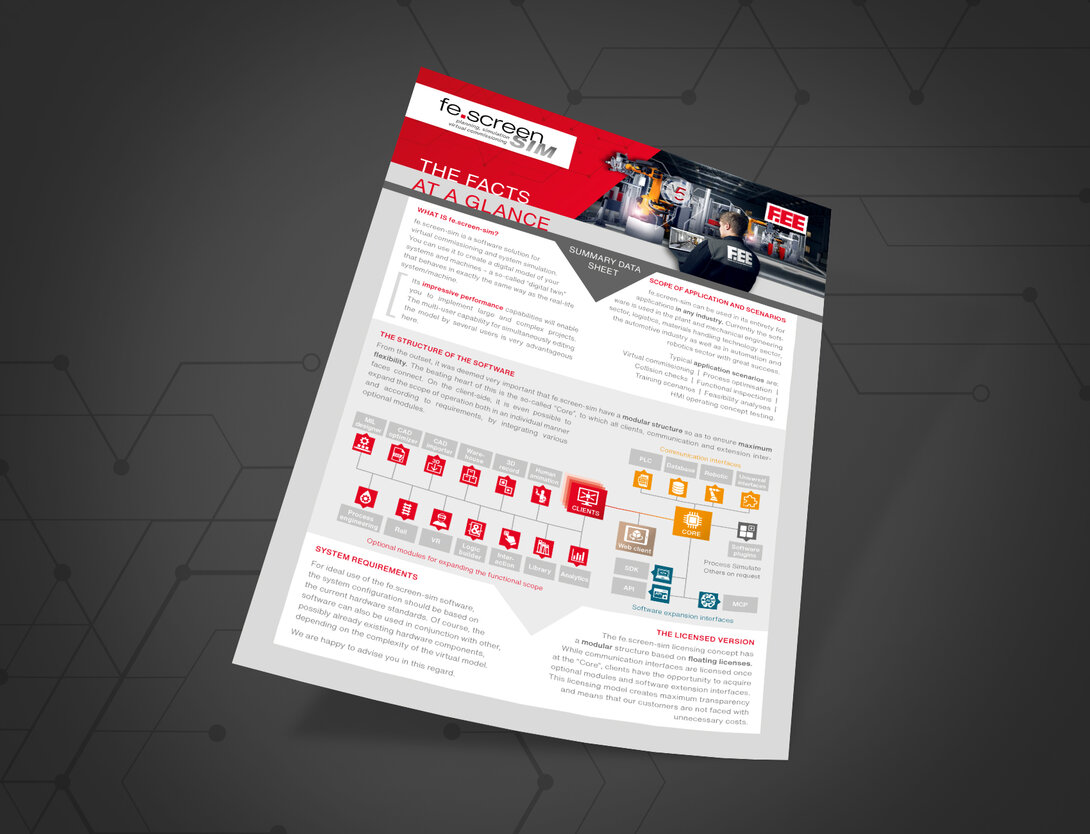
The structure of the virtual commissioning software at a glance
You can find an overview of all information on the structure of the virtual commissioning software and the optional expansion options here.



Your personal contact person – for more clearness
You are a project or department manager and are faced with the question of how to set up a digital twin for your project? We would be happy to talk to you personally about your requirements, the time frame, the possible project approach and give you an initial cost estimate.